

Most desks are too small for three monitors. Three 27-inch screens need about 72 inches of width. Three 24-inch screens need about 64 inches, or 58 if you angle the sides in. Below, we show how big a desk for 3 monitors should be, then six desks that actually fit.
Quick picks
Best overall: FlexiSpot E7 Pro, 72 x 30 in. Electric, deep and wide enough for three 27-inch screens.
Best gaming desk: Arozzi Arena. 63 in wide with a full-surface mouse mat.
Best value 72-inch: Eureka Ergonomic Aero 72.
Best cable management: Secretlab Magnus Pro XL.
Best electric gaming desk: Arozzi Arena Moto.
Best budget corner desk: Mr IRONSTONE L-shaped desk.
This is a research-based guide. We did not test these desks in person. We compared maker specs, retailer listings and published reviews, then did the size math for common monitor sizes. No brand paid to be on this list.
Best Desks for 3 Monitors: Comparison Table
| Desk | Top size | Height | Load rating | Fits |
|---|---|---|---|---|
| FlexiSpot E7 Pro (72 x 30) | 72 x 30 in | 26 to 51.6 in, electric | 440 lb | Three 27-inch, flat |
| Arozzi Arena | 63 x 32.3 in | 28 to 32 in, manual | 176 lb | Three 24-inch, angled |
| Eureka Ergonomic Aero 72 | 72 x about 24 in, wing shape | About 30 in, fixed | 300 lb | Three 27-inch, using the shelves |
| Secretlab Magnus Pro XL | 70 x 31.5 in | 25.6 to 49.2 in, electric | About 265 lb including the desk | Three 27-inch, angled |
| Arozzi Arena Moto | 63 x 32.3 in | 28.7 to 46 in, electric | 265 lb | Three 24-inch, angled |
| Mr IRONSTONE L-shaped | 50.8 x 50.8 in, 18.2 in deep | 29.5 in, fixed | 350 lb (listed) | Two screens plus one around the corner |
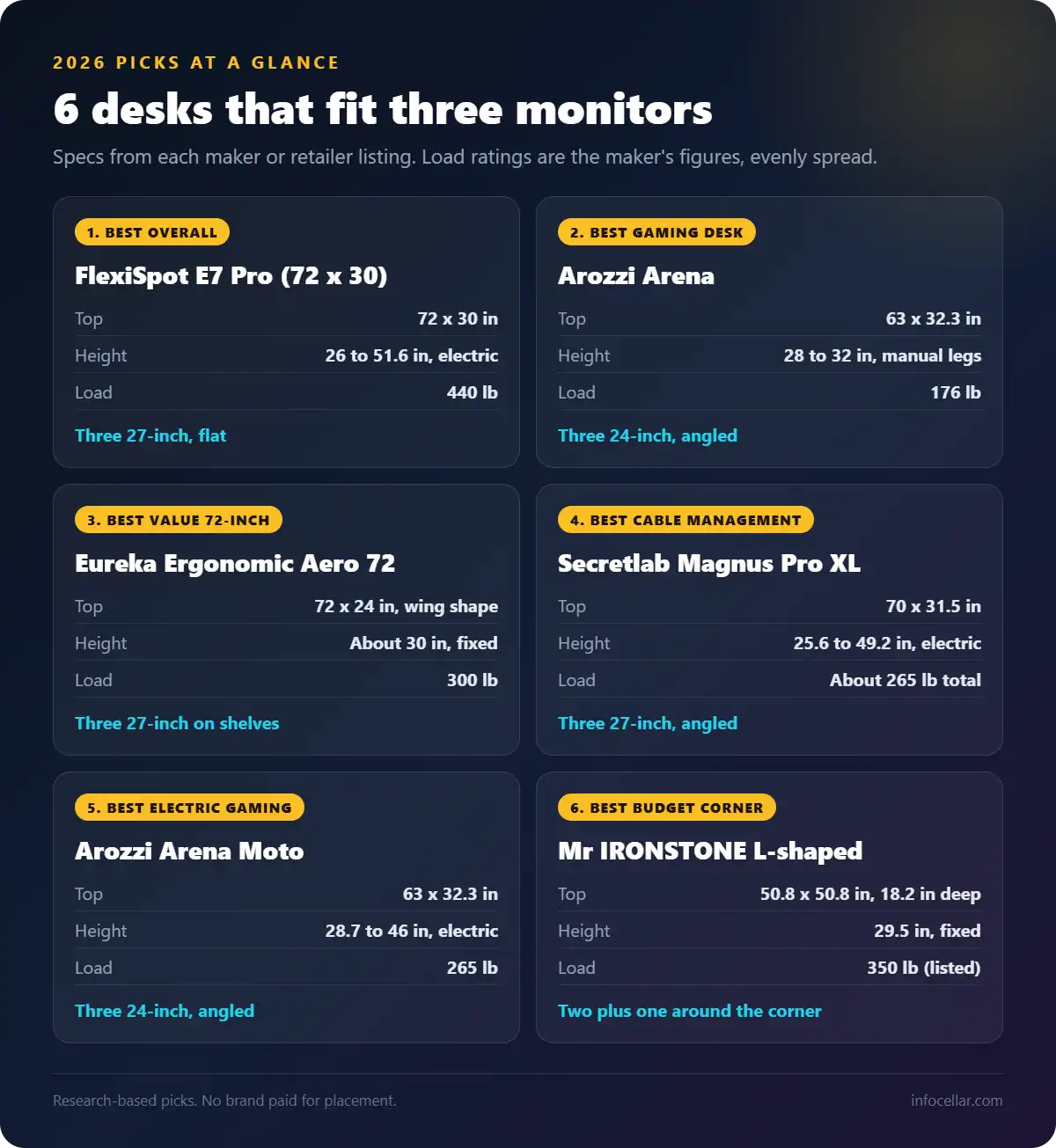
Our six picks for a desk that fits three monitors.

How Big of a Desk Do You Need for 3 Monitors?
Start with your monitor size. A 16:9 monitor is much wider than its diagonal suggests. Here are real widths from Dell spec sheets, bezels included:
- 24-inch: about 21.2 in wide. Three of them side by side need about 64 in.
- 27-inch: about 24.1 in wide. Three side by side need about 72 in.
- 32-inch: about 28 in wide. Three side by side need about 84 in.
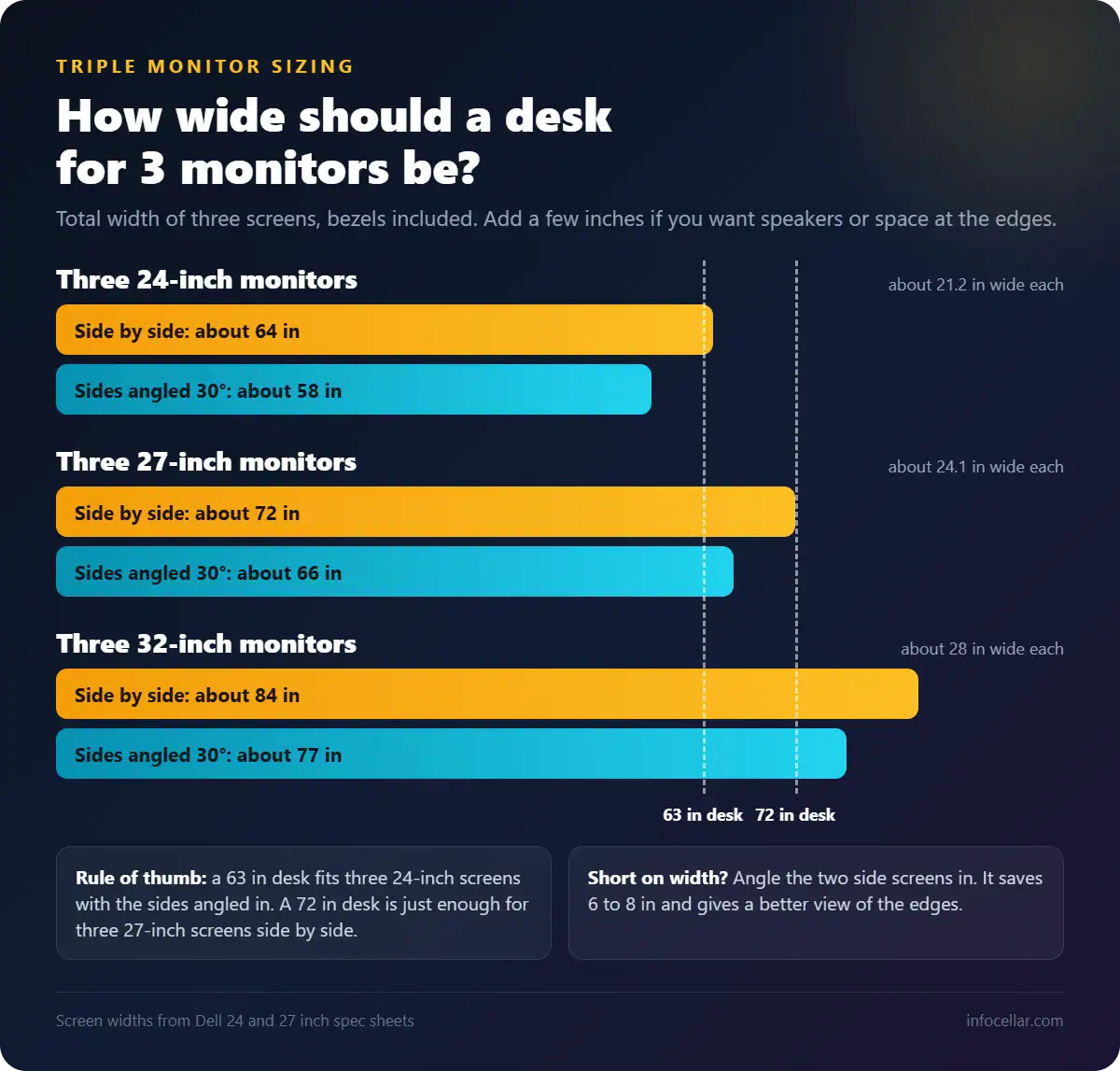
Desk width needed for three 24, 27 and 32 inch monitors.
So a 60-inch desk is too narrow for three 24-inch screens placed flat. It works if you angle the two side screens in. Three 27-inch screens need a 72-inch desk, or a 66-inch desk with angled sides. Three 32-inch screens need monitor arms or a very wide desk.
Flat or Angled: Which Layout Needs Less Space?
Angling the side screens is the easiest way to save width. Turn each outer screen in about 30 degrees, so its inner edge touches the middle screen. That saves 6 to 8 inches.
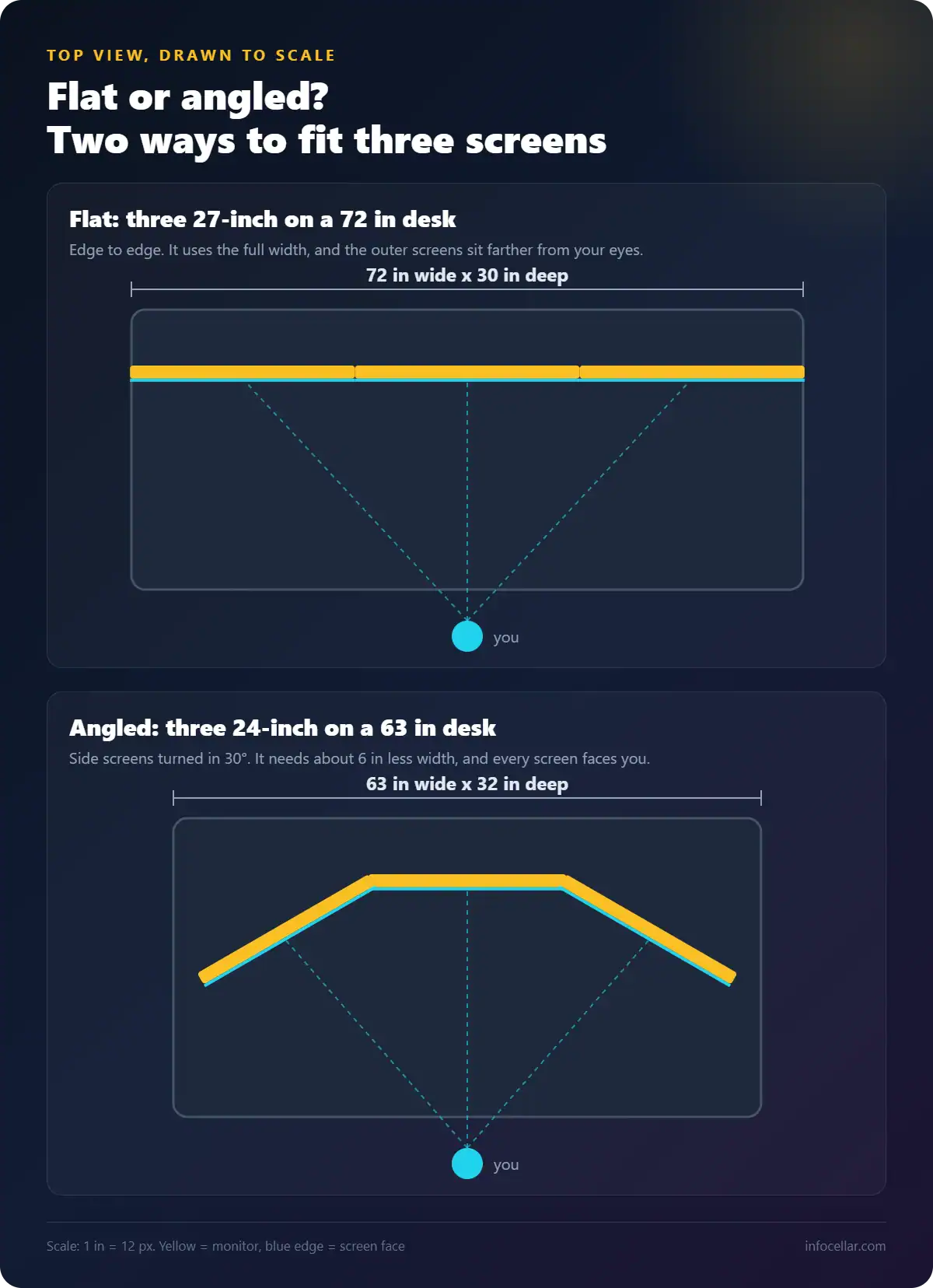
Top view: three 27-inch monitors flat on a 72 in desk, and three 24-inch monitors angled on a 63 in desk.
Angled screens also face you, so you read the far edges without leaning. The tradeoff is depth. The outer screens come forward, so you need a deeper desk or monitor arms. That is why a 63 x 32 in desk like the Arozzi Arena handles three 24-inch screens well.
How Deep Should a Desk Be for 3 Monitors?
Aim for 30 inches deep. OSHA says the preferred viewing distance is 20 to 40 inches from your eyes to the screen. A 30-inch desk leaves room for monitor stands, a keyboard and your forearms, and keeps you in that range.
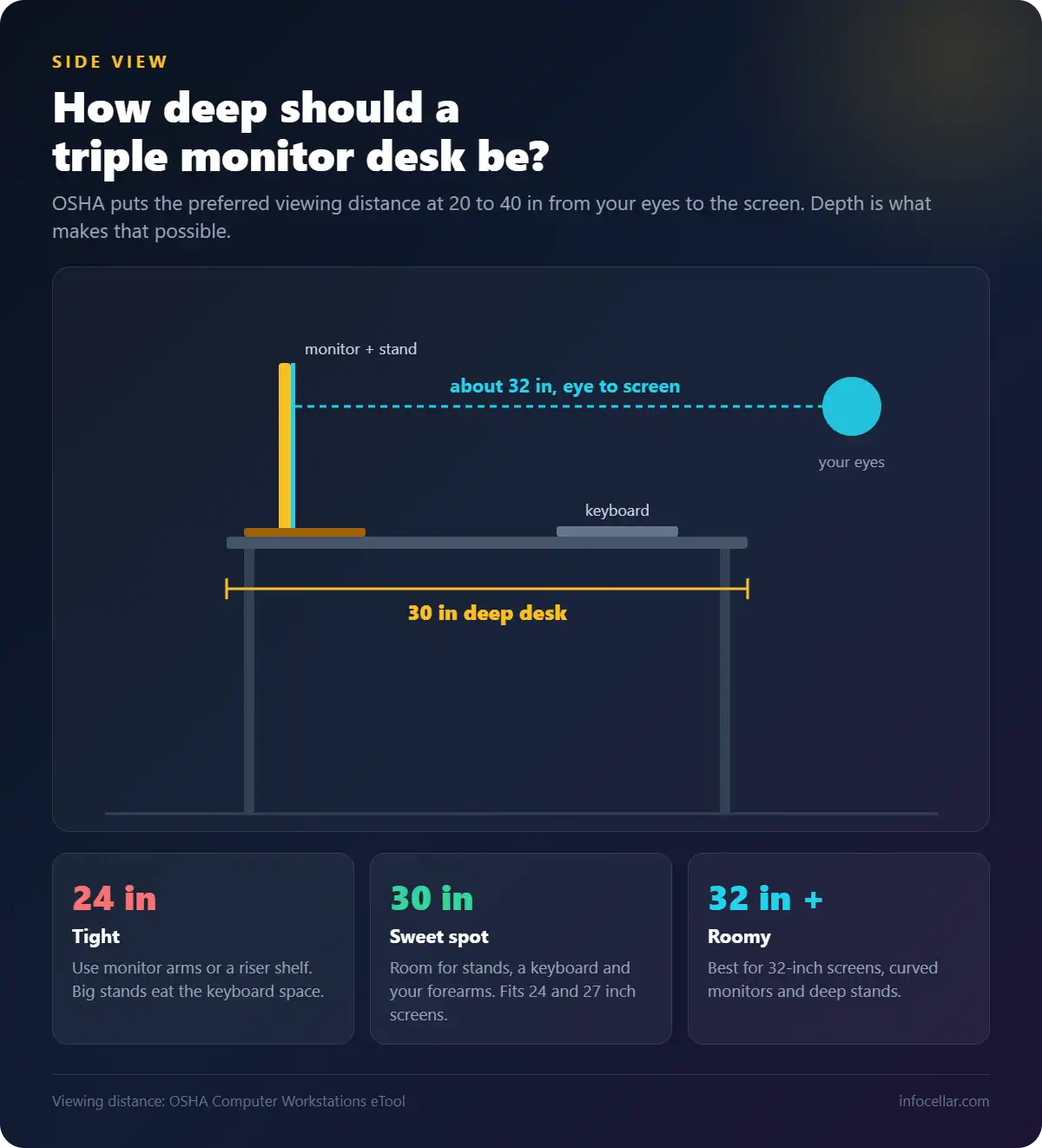
Side view: how desk depth sets your viewing distance.
- 24 in or less: tight. Use monitor arms or a riser shelf so the stands do not eat your keyboard space.
- 30 in: the sweet spot for 24 and 27 inch screens.
- 32 in or more: best for 32-inch, curved or ultrawide screens.
6 Best Desks for 3 Monitors in 2026
Each pick below fits three screens. We list the top size, height range and load rating, then say which monitor setup it suits.
1. FlexiSpot E7 Pro (72 x 30 in): Best Overall
The E7 Pro with a 72 x 30 in top is the safest choice for three 27-inch screens. It is wide enough to place them flat and deep enough for normal stands.
| Top size | 72 x 30 in (other sizes sold) |
|---|---|
| Height range | 26 to 51.6 in, dual motor |
| Load rating | 440 lb |
| Controls | 4 memory presets, USB-A port |
| Fits | Three 27-inch screens side by side |
The frame has longer overlap between the leg stages than the standard E7. FlexiSpot says that cuts wobble at standing height, which matters when three screens sit high. TechRadar called it impressive for height range, lifting capacity and stability. The main downside is price, and the solid tops are heavy.
- Fits three 27-inch screens flat
- 30 in depth keeps a healthy viewing distance
- 440 lb rating covers screens, PC and arms
- Sit or stand
- Costs more than fixed-height desks
- Heavy to move and assemble
- Buy the 72 x 30 in top, not the smaller ones
2. Arozzi Arena: Best Gaming Desk for 3 Monitors
The Arena is the classic gaming desk for a triple setup. The top is 63 in wide and 32.3 in deep, with a curved front edge. A washable microfiber mouse mat covers the whole surface.

| Top size | 63 x 32.3 in (160 x 82 cm) |
|---|---|
| Height range | About 28 to 32 in, set by the legs |
| Load rating | 176 lb (80 kg), evenly spread |
| Desk weight | About 86 lb |
| Fits | Three 24-inch screens, sides angled |
The three cutouts along the back serve two jobs. They route cables, and they let you clamp monitor mounts. A mesh net under the desk holds power bricks. At 63 in, three 24-inch screens fit best with the outer two angled in. For three 27-inch screens, use monitor arms so the outer screens can hang slightly past the edges.
- Deep 32 in top with a curved front
- Full-desk mouse mat is water resistant and machine washable
- Cutouts for cables and monitor mounts
- Many colors
- 63 in is tight for three 27-inch screens
- Height only adjusts a few inches
- Heavy at about 86 lb
3. Eureka Ergonomic Aero 72: Best Value 72-Inch Desk
If you want 72 inches without paying for motors, the Aero 72 is a good buy. The wing shape curves the front edge around you, so your arms rest on the desk at both ends.
| Top size | 72 in wide, about 23 to 24 in deep, wing shape |
|---|---|
| Height | About 30 in, fixed |
| Load rating | 300 lb (Eureka) |
| Extras | Two monitor shelves (30 lb each), keyboard tray, full-desk mouse pad, headphone hook, cup holder |
| Fits | Three 27-inch screens, using the shelves |
The depth is the catch. At about 24 in, big monitor stands crowd the keyboard. The two included shelves fix that for the side screens by raising them up and back. For the middle screen, a monitor arm works well.
- 72 in wide at a fixed-desk price
- Two monitor shelves and a keyboard tray included
- Wing shape keeps your arms supported
- Only about 24 in deep
- No height adjustment
- The RGB look is not for every office
4. Secretlab Magnus Pro XL: Best for Cable Management
The Magnus Pro XL is a steel standing desk built around hidden cables. A power column runs inside one leg, and a covered tray runs along the back. With three monitors, that means far fewer wires in view.
| Top size | 70 x 31.5 in |
|---|---|
| Height range | 25.6 to 49.2 in, dual motor |
| Lift capacity | About 265 lb (120 kg) including the desk itself |
| Controls | 3 height presets |
| Fits | Three 27-inch screens, sides angled |
Two details matter for a triple setup. Notebookcheck found the usable depth is closer to 26 in, because you should not load the cable tray cover. And the lift rating includes the desk’s own weight, so the real payload is lower than the number suggests. It sells mostly through Secretlab, so Amazon stock varies.
- Best cable management on this list
- Magnetic accessories and monitor arms
- Wide height range for tall users
- Usable depth is about 26 in
- Premium price
- Payload is lower than the gross lift figure
5. Arozzi Arena Moto: Best Electric Gaming Desk
The Arena Moto is the Arena with motors. You get the same 63 x 32.3 in top and full-surface mat, plus a sit-stand frame.
| Top size | 63 x 32.3 in |
|---|---|
| Height range | 28.7 to 46 in (73 to 117 cm), dual motor |
| Load rating | 265 lb (120 kg), evenly spread |
| Controls | 4 memory presets |
| Fits | Three 24-inch screens, sides angled |
It keeps the three cutouts and mesh cable basket, and it adds a headset hanger and a crossbar for stiffness. The top height of 46 in suits most people when standing. Very tall users should check that number first.
- Gaming look with sit-stand motors
- Higher load rating than the manual Arena
- Same deep, curved top
- Same 63 in width limit
- Max height may be low for very tall users
6. Mr IRONSTONE L-Shaped Desk: Best Budget Corner Desk
If you only have a corner, an L-shaped desk is the practical answer. This one is cheap, simple and widely sold.

| Top size | 50.8 x 50.8 in, each wing 18.2 in deep |
|---|---|
| Height | 29.5 in, fixed |
| Load rating | 350 lb (as listed) |
| Extras | Monitor stand shelf |
| Fits | Two screens on one wing, one on the other |
Be realistic about the 18.2 in depth. That is shallow for any monitor with a big stand. Put two 24-inch screens along one wing, which needs about 42 in. Put the third on the other wing or on the included shelf. Monitor arms help a lot here. You will turn your head more than with a straight desk, so put your main screen straight ahead.
- Low price
- Fits in a corner
- Monitor shelf included
- Easy to assemble
- Only 18.2 in deep
- Not ideal for three screens in one row
- X-shaped legs can get in the way
Which Triple Monitor Desk Should You Buy?
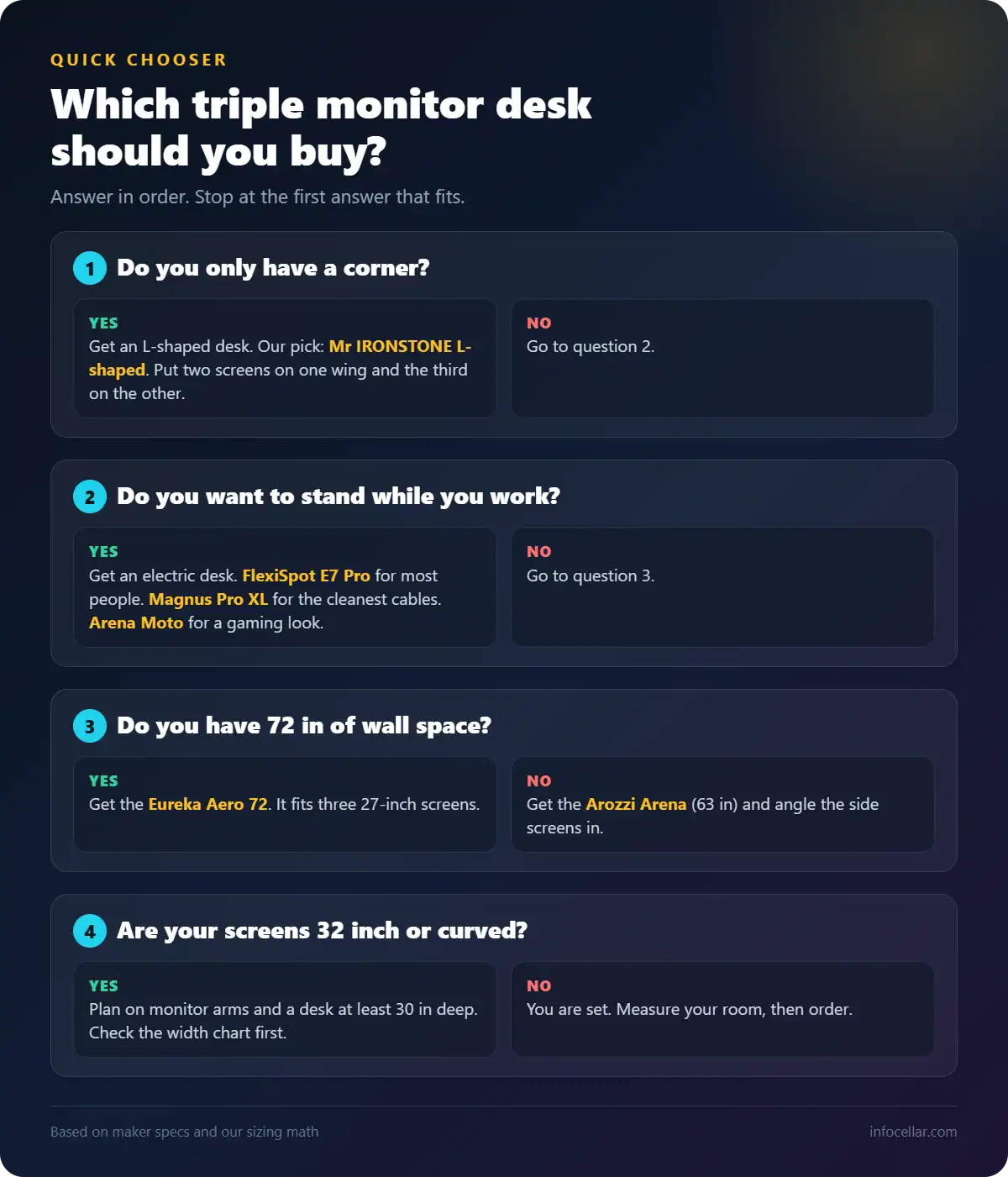
A four-question chooser for picking a triple monitor desk.
Straight, L-Shaped or Standing Desk?
- Straight desk: the best layout for three screens in a row. All three sit at the same distance, and the middle one is straight ahead. Get 63 in or more.
- L-shaped desk: the best fit for corners. It works well with two screens on one wing and one on the other. It is a weaker fit for three in one row, because each wing is usually 50 in or less.
- Standing desk: good for long workdays. Pick a dual-motor frame with a high load rating, because three screens and arms add weight high up, which can make a desk wobble at standing height.
Do You Need Monitor Arms for 3 Monitors?
Not always, but they help in three cases:
- Your desk is 24 in deep or less.
- You want three 27-inch screens on a desk narrower than 72 in. Arms let the outer screens hang slightly past the edges.
- Your monitors have wide, deep stands.
Before you buy a clamp-on arm, check the desk edge. You need a solid edge or grommet hole, and enough room under the top for the clamp. The Arozzi Arena cutouts are made for monitor mounts. For two screens, see our guide to the best monitor stands for 2 monitors.
How Much Weight Does a Desk Need to Hold?
Less than most people think. A 27-inch Dell monitor weighs about 12.6 lb with its stand. Three of them come to about 38 lb. Add a gaming PC at 25 to 40 lb, speakers and arms, and most triple setups land between 80 and 120 lb.
Every desk on this list is rated above that. For standing desks, more headroom is better, because motors work harder near their limit. Your graphics card also matters, since it needs enough outputs for three screens. See our best graphics cards for multiple monitors.
Monitors That Fit These Desks
For three 24-inch screens, a budget 1080p panel keeps cost down. See our reviews of the Acer Nitro VG240Y and the ASUS VG249Q. For three 27-inch screens, a 1440p model like the Acer Nitro VG271U or Acer KG271U is sharper. Thin bezels matter most for the middle screen, because the gaps sit right in your view.
FAQ
How big of a desk do I need for 3 monitors?
For three 24-inch monitors, about 64 in wide, or 58 in with the sides angled. For three 27-inch monitors, about 72 in, or 66 in angled. Aim for 30 in deep.
Can a 60 inch desk hold 3 monitors?
Yes, for three 24-inch monitors with the side screens angled in. Placed flat, they need about 64 in. Three 27-inch monitors do not fit on a 60 in desk without arms.
Is a 55 inch desk big enough for 3 monitors?
Only for small screens. Three 22-inch monitors fit if you angle the sides. For 24-inch or larger, choose 60 in or more.
Can I fit 3 monitors on a 48 inch desk?
Not in a row. Use a stacked layout instead, with two screens on the bottom and one above on a triple arm, or move to an L-shaped desk.
Do three 27-inch monitors fit on a 63 inch desk?
Only with angled sides and monitor arms. Angled, they span about 66 in, so the outer screens hang about 1.5 in past each edge.
How deep should a desk be for 3 monitors?
About 30 in. OSHA recommends 20 to 40 in from your eyes to the screen, and 30 in of depth makes that easy.
Is an L-shaped desk good for 3 monitors?
Yes, for a corner. Put two screens on one wing and one on the other. For three screens in a row, a straight desk 63 in or wider works better.
What is the best gaming desk for 3 monitors?
The Arozzi Arena is our pick. It is 63 x 32.3 in with a full mouse mat and cutouts for monitor mounts. The Arena Moto adds sit-stand motors.
Will a standing desk wobble with 3 monitors?
Some do. Choose a dual-motor desk with a high load rating and a wide frame, like the FlexiSpot E7 Pro. Keep the PC on the floor or a low mount if you can.
Should the middle monitor be straight in front of me?
Yes. OSHA advises placing the monitor directly in front of you. Use the middle screen for your main work and the sides for reference.
How much weight do three monitors add?
About 38 lb for three 27-inch monitors with stands. Arms and a PC can push the total past 100 lb.
Do I need a special graphics card for 3 monitors?
You need one with at least three video outputs, or a mix of GPU and motherboard outputs that your system supports. Most modern cards have three or four.
Final Thoughts
Measure before you buy. Three 24-inch screens need about 64 in flat or 58 in angled. Three 27-inch screens need about 72 in. Most people should get a 30-inch-deep desk. Our top pick is the FlexiSpot E7 Pro with a 72 x 30 in top. For a gaming setup with 24-inch screens, the Arozzi Arena is hard to beat.